When building dynamic web sites with lots of javascript UI components being created on the client, understanding how the web framework you’re using will process the request and what must be done to update fields accordingly is even more important.

Specifically, checkboxes have always been a pain to deal with. The gotcha with checkboxes are if a checkbox isn’t checked, the request doesn’t send the parameter so it requires some additional checks to detect that the user deselected something that was there to update the field accordingly. I’ve been playing around with the Stripes framework and ran into this issue.

With Stripes, you can render a checkbox using their JSP tag:

<stripes:checkbox checked="true" name="property1" value="yes"/>
<stripes:checkbox checked="true" name="property2" value="no"/>

When the “checked” value is equal to “value” value, Stripes will render the checkbox as checked. So with the code shown, two checkboxes will be shown with the first checked and the second unchecked.

If a user reverses this by unchecking the first, checking the second, and submit the form, the HTTP request will only see that property2=no. Before the form was submitted, “property1″ had a value of “yes”. Now, “property1″ won’t even appear in the request parameters, so we have to do special handling to check for the absent of the parameter to update “property1″ to whatever value it should be when it is not checked.

In Spring MVC with form binding, checkboxes are dealt with a little differently. Using Spring MVC’s form JSP tag, you can do:

  <form:checkbox path="property1" value="yes"/>
  <form:checkbox path="property2" value="no"/>

Assuming your command bean is named “person”, this will generate the following HTML:

        <input name="person.property1" type="checkbox" value="yes"/>
        <input type="hidden" value="1" name="_person.property1"/>
        <input name="person.property2" type="checkbox" value="no"/>
        <input type="hidden" value="1" name="_person.property2"/>

As noted by the docs,

What you might not expect to see is the additional hidden field after each checkbox. When a checkbox in an HTML page is not checked, its value will not be sent to the server as part of the HTTP request parameters once the form is submitted, so we need a workaround for this quirk in HTML in order for Spring form data binding to work. The checkbox tag follows the existing Spring convention of including a hidden parameter prefixed by an underscore (“_”) for each checkbox. By doing this, you are effectively telling Spring that “the checkbox was visible in the form and I want my object to which the form data will be bound to reflect the state of the checkbox no matter what”.

Spring MVC also provides a “checkboxes” tag which allows you to render a list of checkbox boxes without having to wrap the “checkbox” tag around a JSTL forEach.

Hopefully, that gives you some insight into how to work with checkboxes in Stripes and Spring MVC.

Posted in geekery, java, tutorials, web at March 29th, 2009. View Comments.

I’ve had my Macbook for a little over a year now. However, I just recently found out Leopard comes with apache (apache2 to be specific) already installed. To verify this is true, open up Terminal and type

>> apachectl -V
Server version: Apache/2.2.9 (Unix)
Server built:   Sep 19 2008 10:58:54
Server's Module Magic Number: 20051115:15
Server loaded:  APR 1.2.7, APR-Util 1.2.7
Compiled using: APR 1.2.7, APR-Util 1.2.7
Architecture:   64-bit
Server MPM:     Prefork
  threaded:     no
    forked:     yes (variable process count)
Server compiled with....
 -D APACHE_MPM_DIR="server/mpm/prefork"
 -D APR_HAS_SENDFILE
 -D APR_HAS_MMAP
 -D APR_HAVE_IPV6 (IPv4-mapped addresses enabled)
 -D APR_USE_FLOCK_SERIALIZE
 -D APR_USE_PTHREAD_SERIALIZE
 -D SINGLE_LISTEN_UNSERIALIZED_ACCEPT
 -D APR_HAS_OTHER_CHILD
 -D AP_HAVE_RELIABLE_PIPED_LOGS
 -D DYNAMIC_MODULE_LIMIT=128
 -D HTTPD_ROOT="/usr"
 -D SUEXEC_BIN="/usr/bin/suexec"
 -D DEFAULT_PIDLOG="/private/var/run/httpd.pid"
 -D DEFAULT_SCOREBOARD="logs/apache_runtime_status"
 -D DEFAULT_LOCKFILE="/private/var/run/accept.lock"
 -D DEFAULT_ERRORLOG="logs/error_log"
 -D AP_TYPES_CONFIG_FILE="/private/etc/apache2/mime.types"
 -D SERVER_CONFIG_FILE="/private/etc/apache2/httpd.conf"

To start up apache, you can do it a couple of ways.

Type sudo apachectl -k start

or

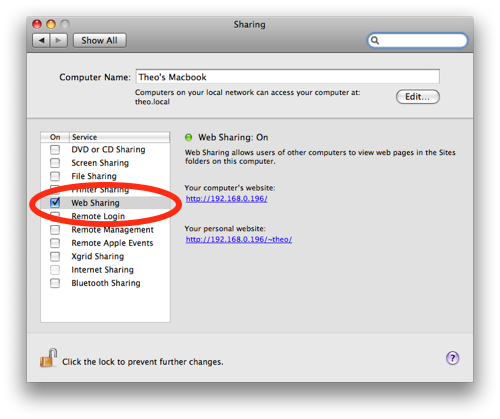
web-sharing

  1. Go to System Preferences
  2. Click on Sharing
  3. Check the box that says Web Sharing

You can go to http://localhost or the URL provided in the Web Sharing screen to confirm apache is running and is able to serve up requests.

There is also a ~/Sites directory in your home folder. Apache is already setup to serve up files from this directory under http://localhost/~[username] where [username] is your user account name. Any files here will be render for example ~/Sites/index.html is accessible from the browser via http://localhost/~[username]/index.html.

One note to get this to work. Out of the box, all requests to /Sites result in a Forbidden 403 error. To resolve this issue, modify the conf file specified above as SERVER_CONFIG_FILE (/private/etc/apache2/httpd.conf in my case) from

<Directory />
    Options FollowSymLinks
    AllowOverride None
    Order deny,allow
    Deny from all
</Directory>

to

<Directory />
    Options FollowSymLinks
    AllowOverride None
    Order deny,allow
    Allow from all
</Directory>

Restart apache (sudo apachectl -k restart) and try going to http://localhost/~[username] again.

Posted in tutorials at January 28th, 2009. View Comments.

The longer I use iPhoto, the more I hate it. When I initially started using it, I would import photos but choose not to copy the originals to the iPhoto Library. In the past year or so, I’ve started to just allow iPhoto to copy the originals to the iPhoto Library. So now, I ended up with photos scattered all over the place. This was a pain to maintain and figure out where my photos were.

I decided that I want all photos to be in one place and if I was going to use iPhoto, I’m going to import by copying the originals to the iPhoto Library. Before I could get all of this to happen, I had to backup all of existing photos that were not in the iPhoto Library to an external hard drive. Planning on importing these photos over again from the external hard drive, I then deleted all of these photos through Finder. Going back into iPhoto, I still saw the thumbnails for the photos I just deleted. If I attempt to open any of them though, it complained it couldn’t find the original. What a mess. There doesn’t seem to be a way to refresh your iPhoto Library and it would remove photos it doesn’t have references to any more.

I figure the easiest way to get my iPhoto Library setup the way I want it is to start from scratch. So I went under my Pictures directory and renamed iPhoto Library to iPhoto Library.original. Opening up iPhoto again, you get prompted to search for your Library or create a new one. I choose create a new iPhoto Library and now I can begin importing my photos.

iphoto-prefs

After making sure I have the option to copy items to iPhoto Library when importing, I can now import photos from my external hard drive.

Great! Now I have all of my scattered photos in iPhoto Library. But what about the photos I had imported to the original iPhoto Library ( the ones under iPhoto Library.original)? Well, there didn’t seem to be an easy way to import non-broken originals form one iPhoto Library to another from the GUI so I went to the command line.

All of the original photos that are imported to an iPhoto Library are under a folder called Originals. However, due to the way iPhoto manages the photos, this also includes the broken files that reference the photos I had deleted. Basically I wanted to get rid of all of these broken references before importing all of the photos from my original iPhoto Library to the new one I am creating. Here’s how I did it.

  1. Open up Terminal
  2. Change directory to the original iPhoto Library’s Originals directory (~/Pictures/iPhoto Library.original/Originals)
  3. The broken references aren’t actually symbolic links. They seem to be using extended file attributes to denote where the original file actually is (see xattr).  Since we deleted the actual photos, to identify these files type:
    find . -size 0
    

    to get a list of all of the 0 byte files.

  4. To remove them:
    find . -name "*.jpg" -size 0 -exec rm {}  \;
    

    or if you want to just move them elsewhere:

    find . -name "*.jpg" -size 0 -exec mv {} $dest \;
    

    where $dest is the path to where you want to move the files

  5. To delete all of the empty directories (that represent your events) for clean up purposes:
    find . -depth -type d -empty -exec rmdir {} \;

Now your original iPhoto Library should only contain photos that were imported by copying the originals to the iPhoto Library.

To finish importing everything, open iPhoto, choosing your new iPhoto Library and import the Originals directory from the original iPhoto Library (~/Pictures/iPhoto Library.originals/Originals). You might have to copy this folder someplace else since the Import menu doesn’t allow you to specify going into the iPhoto Library.originals package.

After about 5 hours of battling with iPhoto, I think I finally have all of my photos reimported to a fresh iPhoto Library with no duplicates and broken file references. Having to do all of this really makes me think to just switch to something else. How do you guys feel about iPhoto? What are some good alternatives? Picasa anyone?

Posted in tutorials at January 25th, 2009. View Comments.

rsvp.theoandpat.com had boolean flag to marked whether or not a visitor was going to be able to make it to our wedding. Unfortunately, if you selected you were not able to make it and submit the form, the application would return saying it could not process your submission because you have to say that you are going to make it. I argued, this is an RSVP form so you have to accept if you are RSVPing. That’s the point of the RSVP! Only people RSVP would bother submitting the form!  Pat wasn’t too happy about that and ask/told me to fix it. 

Digging into it, it turns out the way  for validates_presence_of relies on Object#blank which of course when sent

false.blank? # returns true

Reading up on the documentation, it is suggested to use validates_inclusion_of when dealing with booleans.

The one line change solved the problem:

validates_inclusion_of :accepted, :in => [true, false]
Posted in geekery, ruby, tutorials at January 12th, 2009. View Comments.

As I am running more and more on my 256mb slice, I’m trying to squeeze more performance out of the system. After a bit of digging, I’ve made a few changes.

First thing I did was switch out the default mysql config with one tweaked for smaller boxes. This configuration actually came with the mysql installation under /usr/share/doc/mysql-server-5.0/examples/. Just backup your existing my.cnf (mine is located under /etc/mysql) and use the following:

# The following options will be passed to all MySQL clients
[client]
port		= 3306
socket		= /var/run/mysqld/mysqld.sock

# Here follows entries for some specific programs

# The MySQL server
[mysqld]
port		= 3306
socket		= /var/run/mysqld/mysqld.sock
skip-locking
key_buffer = 16K
max_allowed_packet = 1M
table_cache = 4
sort_buffer_size = 64K
read_buffer_size = 256K
read_rnd_buffer_size = 256K
net_buffer_length = 2K
thread_stack = 64K

# Don't listen on a TCP/IP port at all. This can be a security enhancement,
# if all processes that need to connect to mysqld run on the same host.
# All interaction with mysqld must be made via Unix sockets or named pipes.
# Note that using this option without enabling named pipes on Windows
# (using the "enable-named-pipe" option) will render mysqld useless!
#
#skip-networking
server-id	= 1

# Uncomment the following if you want to log updates
#log-bin=mysql-bin

# Uncomment the following if you are NOT using BDB tables
#skip-bdb

# Uncomment the following if you are using InnoDB tables
#innodb_data_home_dir = /var/lib/mysql/
#innodb_data_file_path = ibdata1:10M:autoextend
#innodb_log_group_home_dir = /var/lib/mysql/
#innodb_log_arch_dir = /var/lib/mysql/
# You can set .._buffer_pool_size up to 50 - 80 %
# of RAM but beware of setting memory usage too high
#innodb_buffer_pool_size = 16M
#innodb_additional_mem_pool_size = 2M
# Set .._log_file_size to 25 % of buffer pool size
#innodb_log_file_size = 5M
#innodb_log_buffer_size = 8M
#innodb_flush_log_at_trx_commit = 1
#innodb_lock_wait_timeout = 50

[mysqldump]
quick
max_allowed_packet = 16M

[mysql]
no-auto-rehash
# Remove the next comment character if you are not familiar with SQL
#safe-updates

[isamchk]
key_buffer = 8M
sort_buffer_size = 8M

[myisamchk]
key_buffer = 8M
sort_buffer_size = 8M

[mysqlhotcopy]
interactive-timeout

You can see estimated memory usage with a config if you just copy paste the configuration file here.

Restart MySQL (/etc/init.d/mysql restart).

The second thing I did was check out MySQLTuner. Just download the perl script and run it. It will run some analysis on your mysql setup and provide some performance and configuration tweak recommendations.

Sample output looks like this:

 >>  MySQLTuner 1.0.0 - Major Hayden 
 >>  Bug reports, feature requests, and downloads at http://mysqltuner.com/
 >>  Run with '--help' for additional options and output filtering
Please enter your MySQL administrative login: root
Please enter your MySQL administrative password: 

-------- General Statistics --------------------------------------------------
[--] Skipped version check for MySQLTuner script
[OK] Currently running supported MySQL version 5.0.51a-3ubuntu5.4
[OK] Operating on 64-bit architecture

-------- Storage Engine Statistics -------------------------------------------
[--] Status: +Archive -BDB -Federated +InnoDB -ISAM -NDBCluster
[--] Data in MyISAM tables: 867K (Tables: 18)
[--] Data in InnoDB tables: 704K (Tables: 40)
[!!] Total fragmented tables: 2

-------- Performance Metrics -------------------------------------------------
[--] Up for: 14h 57m 0s (17K q [0.316 qps], 699 conn, TX: 55M, RX: 3M)
[--] Reads / Writes: 96% / 4%
[--] Total buffers: 26.0M global + 824.0K per thread (100 max threads)
[OK] Maximum possible memory usage: 106.5M (41% of installed RAM)
[OK] Slow queries: 0% (0/17K)
[OK] Highest usage of available connections: 6% (6/100)
[!!] Key buffer size / total MyISAM indexes: 16.0K/381.0K
[!!] Key buffer hit rate: 88.5% (154K cached / 17K reads)
[!!] Query cache is disabled
[OK] Sorts requiring temporary tables: 0% (0 temp sorts / 4K sorts)
[!!] Temporary tables created on disk: 30% (1K on disk / 4K total)
[!!] Thread cache is disabled
[!!] Table cache hit rate: 0% (4 open / 7K opened)
[OK] Open file limit used: 0% (8/1K)
[OK] Table locks acquired immediately: 99% (17K immediate / 17K locks)
[OK] InnoDB data size / buffer pool: 704.0K/8.0M

-------- Recommendations -----------------------------------------------------
General recommendations:
    Run OPTIMIZE TABLE to defragment tables for better performance
    MySQL started within last 24 hours - recommendations may be inaccurate
    Enable the slow query log to troubleshoot bad queries
    When making adjustments, make tmp_table_size/max_heap_table_size equal
    Reduce your SELECT DISTINCT queries without LIMIT clauses
    Set thread_cache_size to 4 as a starting value
    Increase table_cache gradually to avoid file descriptor limits
Variables to adjust:
    key_buffer_size (> 381.0K)
    query_cache_size (>= 8M)
    tmp_table_size (> 32M)
    max_heap_table_size (> 16M)
    thread_cache_size (start at 4)
    table_cache (> 4)

I haven’t made any of the recommended changes yet though. I am going to try to see how this default small config performs.

I’ll try to follow up with any of my findings.

Posted in tutorials at December 7th, 2008. View Comments.